vim – bufexplorer
| 20-Nov-2012 | Posted by Sonia Hamilton under Golang, Vim |
Bufexplorer – my new favourite add-on for vim.
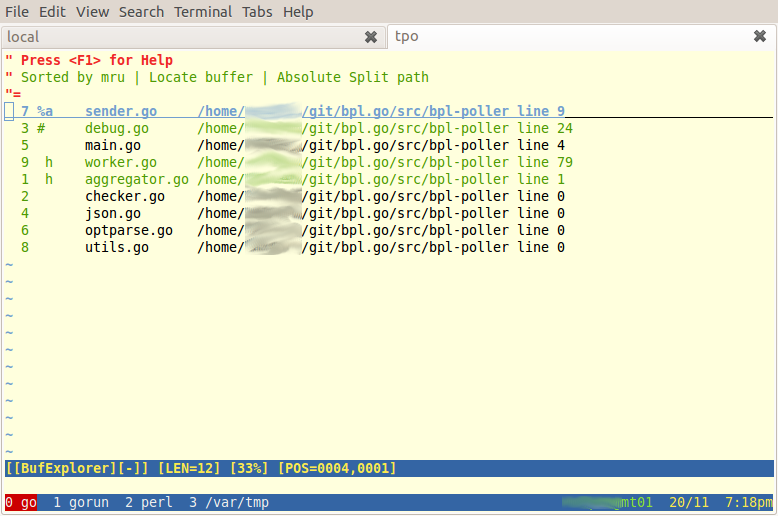
Why do I like it? It allows you to emulate the buffer list feature of emacs, as well as switch between horizontal/vertical buffer splits and find recently edited files. All this can already be done with vim buffers, but bufexplorer makes it easy.
Why don’t I just use emacs? Because as sysadmin/devop I’m often working on other people’s servers, and I don’t want to go installing buckets of stuff everywhere – vim is usually installed.
I found the best way to use bufexplorer is to open up all possible source files (eg vim src/*.go other/*.go) at the start of an editing session, then just skip between them (shown here with the excellent xMonad window manager, GNU Screen, and Gnome Terminal):
Share This

I just use :files which shows the same thing, then :b # (where # is the buffer number).
Thanks Steve. I used to use :files, I find bufexplorer easier for large numbers of files, especially the different sort orders.
:files is just too long! Use :ls instead;]
Thanks Bartosz. \be is even shorter ;-) (buffer explorer)
I was trying to tame all those buffer explorers, but ended up with `:CtrlPBuffer` provided by ctrlp.vim bound to `bl`. Worth checking out.
(Thanks for moving-screen-windows advice, I got here looking for it)
No worries, I’ll check out ctrlp.vim!
ctrlp.vim could change your workflow of opening all the source code files in a directory, too: it’s pretty nice to type only, say, ’11cli’ to open `novaclient/v1_1/client.py`. You don’t even have to track and copy all those FS hierarchies when you need to open a file imported/included/required/whatevered in opened one, for example :)